运行测试程序
以下命令请在RaspberryPi下执行,否则不在索引不到目录;
C语言
-
重新编译,编译过程可能需要几秒
cd csudo make cleansudo make -j 8
所有屏幕的测试程序,可以直接通过输入对应的尺寸进行调用:
sudo ./main 屏幕尺寸
根据不同LCD,应当输入以下某一条指令:
#0.96inch LCD Module
sudo ./main 0.96
#1.14inch LCD Module
sudo ./main 1.14
#1.28inch LCD Module
sudo ./main 1.28
#1.3inch LCD Module
sudo ./main 1.3
#1.47inch LCD Module
sudo ./main 1.47
#1.54inch LCD Module
sudo ./main 1.54
#1.8inch LCD Module
sudo ./main 1.8
#2inch LCD Module
sudo ./main 2
#2.4inch LCD Module
sudo ./main 2.4
python
-
进入python程序目录,并运行指令ls -l
cd python/examplels -l
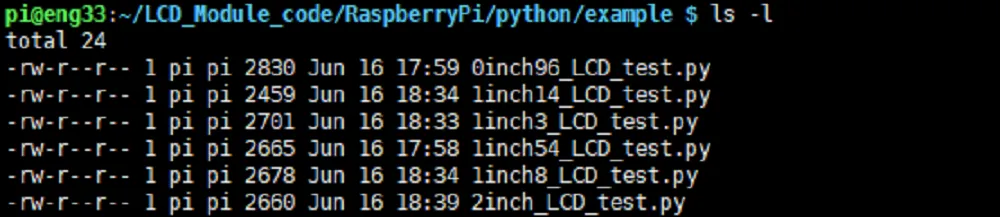
可以查看到所有屏幕的测试程序,按照尺寸分类:
| 0inch96_LCD_test.py | 0.96inch LCD测试程序 |
|---|---|
| 1inch14_LCD_test.py | 1.14inch LCD测试程序 |
| 1inch28_LCD_test.py | 1.28inch LCD测试程序 |
| 1inch3_LCD_test.py | 1.3inch LCD测试程序 |
| 1inch47_LCD_test.py | 1.47inch LCD测试程序 |
| 1inch54_LCD_test.py | 1.54inchLCD测试程序 |
| 1inch8_LCD_test.py | 1.8inch LCD测试程序 |
| 2inch_LCD_test.py | 2inch LCD测试程序 |
| 2inch4_LCD_test.py | 2.4inch LCD测试程序 |
-
运行对应屏幕的程序即可,程序支持python2/3
# python2sudo python 0inch96_LCD_test.pysudo python 1inch14_LCD_test.pysudo python 1inch28_LCD_test.pysudo python 1inch3_LCD_test.pysudo python 1inch47_LCD_test.pysudo python 1inch54_LCD_test.pysudo python 1inch8_LCD_test.pysudo python 2inch_LCD_test.pysudo python 2inch4_LCD_test.py# python3sudo python3 0inch96_LCD_test.pysudo python3 1inch14_LCD_test.pysudo python3 1inch28_LCD_test.pysudo python3 1inch3_LCD_test.pysudo python3 1inch47_LCD_test.pysudo python3 1inch54_LCD_test.pysudo python3 1inch8_LCD_test.pysudo python3 2inch_LCD_test.pysudo python3 2inch4_LCD_test.py