搭配 Luckfox Omni3576 使用
硬件连接
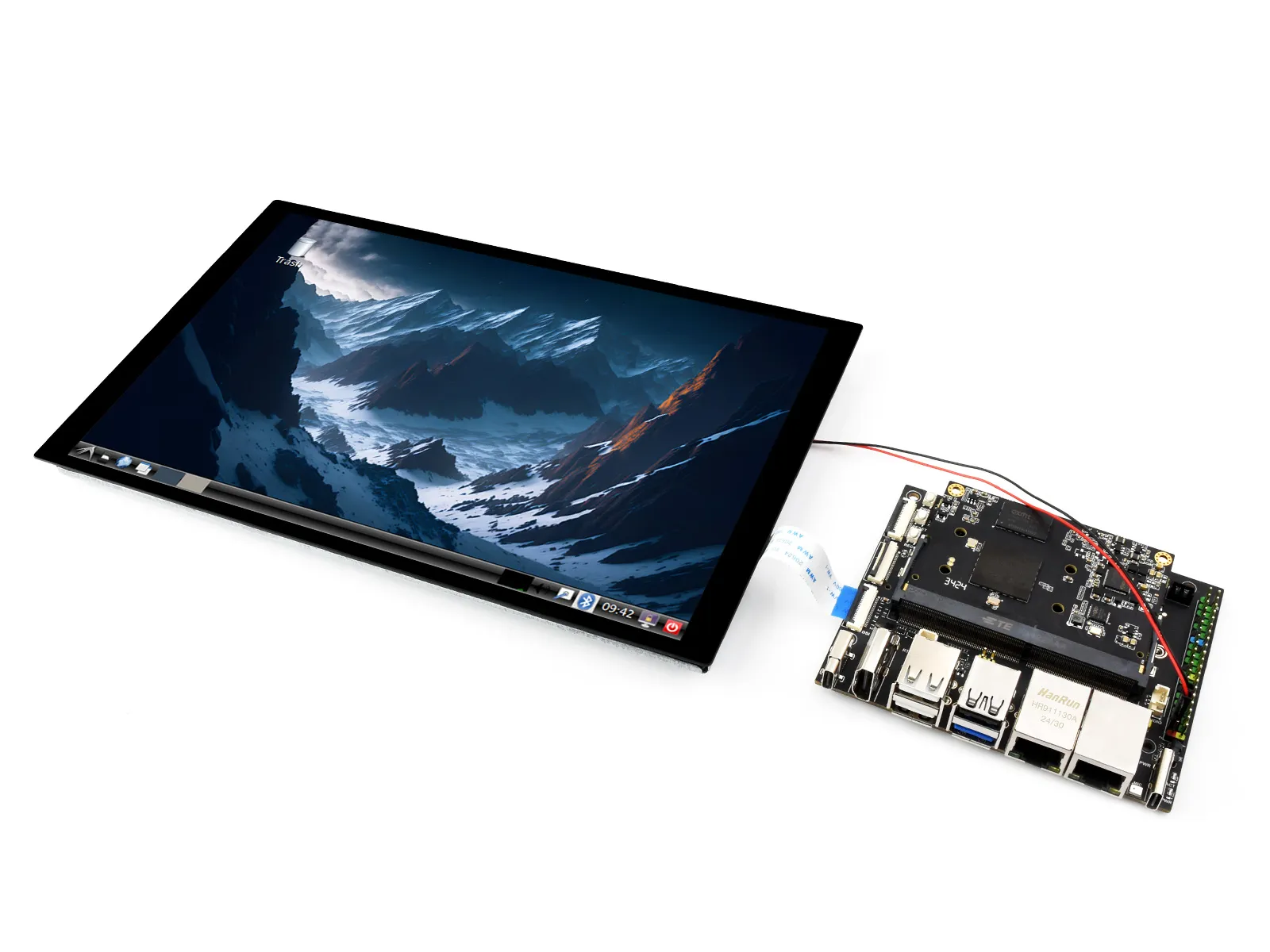
1. 使用22PIN的FPC排线,将显示屏DSI接口连接到Omni3576主板的DSI接口。
2. 使用2PIN电源连接线,将显示屏的电源接口连接到Omni3576主板的40PIN GPIO接口。如下图所示:
软件设置
1. 下载并使用幸狐官网的镜像文件进行烧录对应系统镜像。
2. 给Omni3576主板接入5V电源,待系统启动后屏幕即可亮起
查看屏幕信息
-
当前系统中可用的屏幕 ID 可通过以下命令查看:
sudo cat /sys/kernel/debug/dri/0/summary -
正常会得到以下输出:
Video Port0: DISABLEDVideo Port1: ACTIVEConnector:DSI-1 Encoder: DSI-203bus_format[100a]: RGB888_1X24overlay_mode[0] output_mode[0] SDR[0] color-encoding[BT.709] color-range[Full]Display mode: 800x1280p60clk[70000] real_clk[69883] type[48] flag[a]H: 800 840 860 880V: 1280 1300 1304 1324Fixed H: 800 840 860 880Fixed V: 1280 1300 1304 1324Esmart1-win0: ACTIVEwin_id: 1format: XR24 little-endian (0x34325258) pixel_blend_mode[0] glb_alpha[0xff]color: SDR[0] color-encoding[BT.601] color-range[Limited]rotate: xmirror: 0 ymirror: 0 rotate_90: 0 rotate_270: 0csc: y2r[0] r2y[0] csc mode[0]zpos: 1src: pos[0, 0] rect[800 x 1280]dst: pos[0, 0] rect[800 x 1280]buf[0]: addr: 0x00000000fe44e000 pitch: 3200 offset: 0Video Port2: DISABLED
显示旋转
-
旋转指令
#旋转90度xrandr -o left#旋转270度xrandr -o right#旋转180度xrandr -o inverted#旋转0度xrandr -o normal -
使用 xrandr 旋转的效果是一次性的,系统重启后屏幕显示方向会还原。 如果要开机自动旋转,则需要修改配置文件:
sudo vim /etc/X11/xorg.conf.d/10-monitor.conf
添加以下语句:
### Valid values for rotation are "normal", "left", "right"
Section "Monitor"
#    Identifier "Default Monitor"
    Identifier  "DSI-1"
    Option      "Rotate" "left"
EndSection
触摸旋转
-
系统显示旋转后,触摸方向不一致,需要按下文操作进行触摸旋转:
sudo vim /etc/udev/rules.d/99-luckfox-touch.rules -
根据自己的旋转方向,加入对应的配置,保存后重启开发板。
90度:ENV{ID_INPUT_TOUCHSCREEN}=="1", ENV{LIBINPUT_CALIBRATION_MATRIX}="0 -1 1 1 0 0"180度:ENV{ID_INPUT_TOUCHSCREEN}=="1", ENV{LIBINPUT_CALIBRATION_MATRIX}="-1 0 1 0 -1 1"270度:ENV{ID_INPUT_TOUCHSCREEN}=="1", ENV{LIBINPUT_CALIBRATION_MATRIX}="0 1 0 -1 0 1"