搭配 树莓派 使用
硬件连接
连接树莓派的时候,可以直接将板子插到树莓派的 40PIN 排针上去,注意对好引脚。
如果是选择用 10PIN 排线连接的话,请参考下方的引脚对应表格:
树莓派连接引脚对应关系
| e-Paper | Raspberry Pi | Raspberry Pi |
|---|---|---|
| BCM2835编码 | Board物理引脚序号 | |
| VCC | 3.3V | 3.3V |
| GND | GND | GND |
| DIN | MOSI | 19 |
| CLK | SCLK | 23 |
| CS_M | CE0 | 24 |
| CS_S | CE1 | 26 |
| DC | 25 | 22 |
| RST | 17 | 11 |
| BUSY | 24 | 18 |
| PWR | 18 | 12 |
树莓派前置设置
关闭SPI接口
-
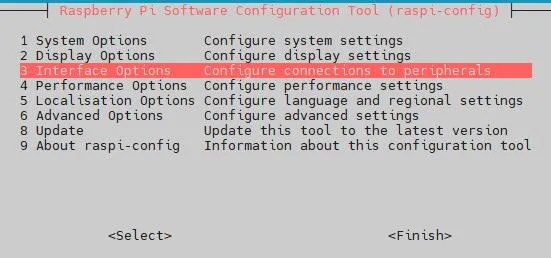
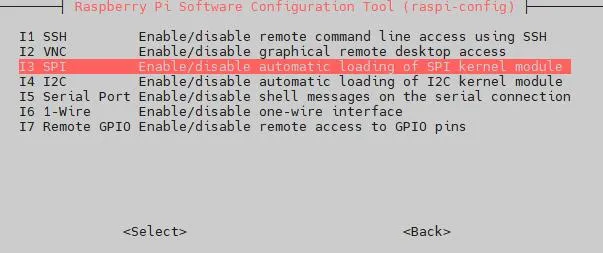
打开树莓派终端,输入以下指令进入配置界面:
sudo raspi-config选择Interfacing Options -> SPI -> No 关闭SPI接口

-
重启树莓派:
sudo reboot
运行C语言例程
-
安装 wiringPi
git clone https://github.com/WiringPi/WiringPicd WiringPi./buildgpio -v# 运行 gpio -v 会出现对应版本,如果没有出现,说明安装出错。 -
安装 BCM2835 (可选)
#打开树莓派终端,并运行以下指令:wget http://www.airspayce.com/mikem/bcm2835/bcm2835-1.71.tar.gztar zxvf bcm2835-1.71.tar.gzcd bcm2835-1.71/sudo ./configure && sudo make && sudo make check && sudo make install# 更多的可以参考官网:http://www.airspayce.com/mikem/bcm2835/ -
下载程序(已下载可跳过)
wget https://www.waveshare.net/w/upload/f/fc/10.85inch_e-Paper_G.zipunzip 10.85inch_e-Paper_G.zip -d 10.85inch_e-Paper_Gcd 10.85inch_e-Paper_G/RaspberryPi/ -
备用解压方式
sudo apt-get install p7zip-full7z x 10.85inch_e-Paper_G.zip -O./10.85inch_e-Paper_Gcd 10.85inch_e-Paper_G/RaspberryPi/ -
通过 GitHub 下载程序(备用方式,已下载可跳过)
目前访问 GitHub 并不是很流畅,建议使用上面的方法从我们官网下载。
git clone https://github.com/waveshare/e-Paper.git
cd e-Paper/E-paper_Separate_Program/10.85inch_e-Paper_G/RaspberryPi/
-
编译程序(说明:-j4 为使用4线程编译,数字可自行修改)
# 此时在 10.85inch_e-Paper_G/RaspberryPi_JetsonNano 位置cd csudo make cleansudo make -j4 -
运行程序
sudo ./epd
运行python例程
-
安装函数库
sudo apt-get updatesudo apt-get install python3-pipsudo apt-get install python3-pilsudo apt-get install python3-numpysudo apt-get install python3-spidev -
安装函数库(python2)
sudo apt-get updatesudo apt-get install python-pipsudo apt-get install python-pilsudo apt-get install python-numpysudo apt-get install python-spidev -
下载程序(已下载可跳过)
wget https://www.waveshare.net/w/upload/f/fc/10.85inch_e-Paper_G.zipunzip 10.85inch_e-Paper_G.zip -d 10.85inch_e-Paper_Gcd 10.85inch_e-Paper_G/RaspberryPi/ -
备用解压方式
sudo apt-get install p7zip-full7z x 10.85inch_e-Paper_G.zip -O./10.85inch_e-Paper_Gcd 10.85inch_e-Paper_G/RaspberryPi/ -
通过 GitHub 下载程序(备用方式,已下载可跳过)
目前访问 GitHub 并不是很流畅,建议使用上面的方法从我们官网下载。
git clone https://github.com/waveshare/e-Paper.git
cd e-Paper/E-paper_Separate_Program/10.85inch_e-Paper_G/RaspberryPi/
-
运行程序
# 确保在 10.85inch_e-Paper_G/RaspberryPi/ 位置cd python/examples/python3 epd_10in85g_test.py